
 K-POP
K-POPYG audition application mistake: can you edit it after submitting?
YG submitted applications cannot be edited directly. Cancel and reapply with corrections only while cancellation remains available before manager review.
2026년 10월 10일
Andxo·2026년 10월 10일2026년 10월 기준 정보
SM’s current email audition instructions ask for your name, age, gender and application field in the subject line, with performance media and a front-facing face photograph attached. Send through the address on the current official page: [email protected]. This email route is separate from the homepage form and a city-specific global audition.
The question here comes from SM’s official email instructions and FAQ. It is a submission checklist, not a promise of an interview or an explanation of how SM scores applicants.
| Item | Current official instruction |
|---|---|
| Recipient | [email protected] |
| Subject | Name / age / gender / application field |
| Materials | Singing, dance or acting media and front-facing face photograph |
| Photo extensions | JPG, GIF, PNG |
| Listed media extensions | WMA, MP4, WAV, MOV |
| Eligibility for this route | Regardless of nationality, age or gender |
| Result notification | Successful applicants contacted individually within one month |
SM lists WMA and WAV together with its media extensions. These are ordinarily audio formats; this guide reproduces the list without claiming they show a moving picture. Check that the attachment actually demonstrates the field you choose.
Your name / Your age / Your gender / Vocal. The words in that example are placeholders, not applicant information to copy unchanged.Do not rename an unsupported file to “.mp4” as a workaround. Changing the name does not convert its contents. Export a supported format using your media application. That is practical file handling advice; the official page does not provide a conversion tutorial or universal file-size limit.
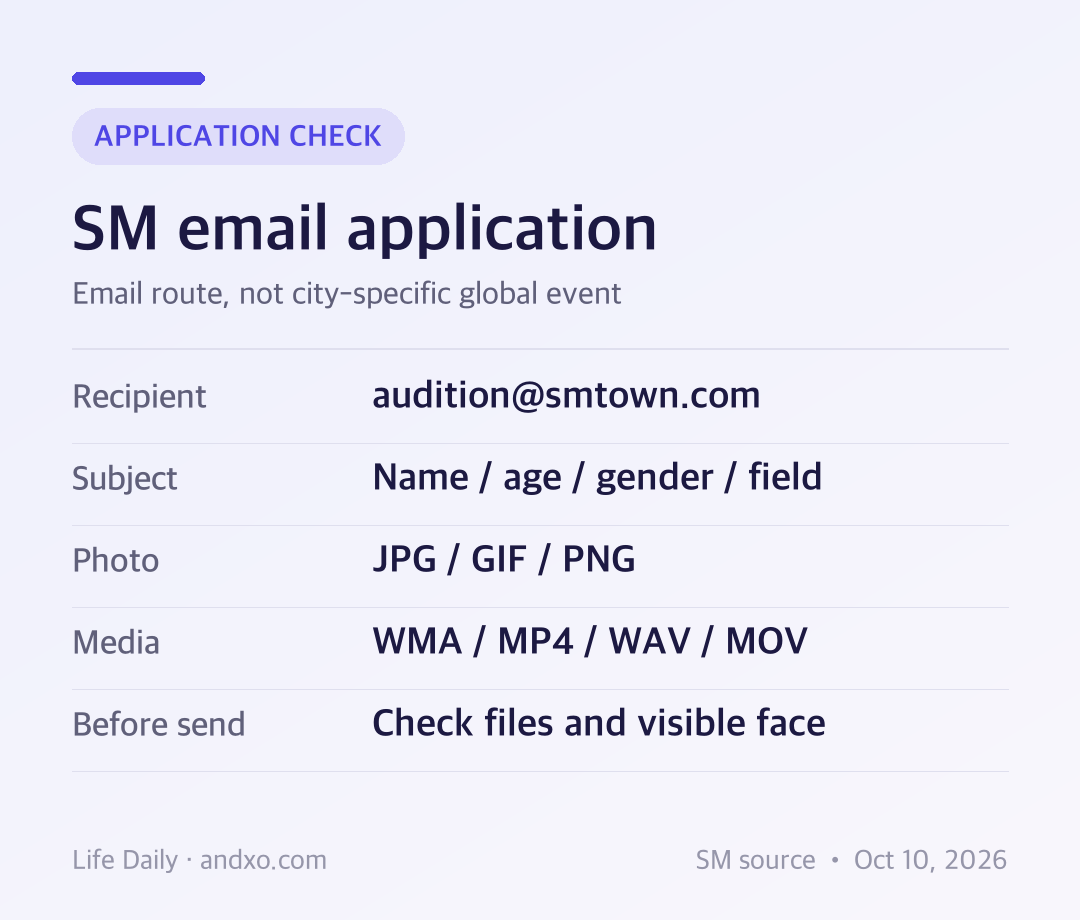
Original Andxo preparation chart based on SM’s official E-MAIL audition section, checked October 10, 2026. It explains the process and is not an official email form.
SM says edited photographs, including Photoshop-treated images, and photographs with the face excessively covered by hands or clothing are excluded from evaluation. The email FAQ also asks applicants to avoid filters or effects in photographs and videos for accurate assessment. Keep your face visible and check the file that will actually be sent.
The official overview says extensions outside its designated list, including PSD, AI and CDA, cannot be evaluated. An editing project file is not a substitute for an exported photo or performance file. Do not send a design project because it opens correctly on your own computer.
There is no email-specific duration or file-size limit established by the sections checked for this guide. Do not borrow a limit from a different agency, the homepage form or a particular global-audition event. If your mail application rejects an attachment, check that service’s limits and ask through SM’s current official support channel where needed.
SM’s email FAQ says successful applicants receive individual contact within one month. It does not promise every applicant a rejection message. Monitor the mailbox you used, including its spam folder, but do not assume that a lack of response proves a technical failure or establishes a selection result before the stated window.
The homepage route uses email verification and offers application status in MY STATUS. This guide does not claim that an email audition automatically appears there. Choose one route deliberately and follow that route’s own instructions.
Can overseas applicants use this email route? The current E-MAIL section and email FAQ say applicants can apply regardless of nationality, age or gender. Specific global events can have separate conditions.
Can I select more than one field? The email FAQ allows overlapping selection among vocal, dance, rap and acting. Identify your field or fields clearly; this guide does not invent a maximum attachment count.
Can I send a cloud link instead of an attachment? The checked instructions say attach files. They do not confirm a cloud-link substitution, so do not treat one as equivalent without current official clarification.
Will everyone receive a result email? The stated contact rule is for successful applicants, individually within one month.
For choosing an audition program, return to the audition hub. Use the exact current route’s rules before preparing an application.
SM official audition overview, E-MAIL section and SM official FAQ, email audition entries, checked October 10, 2026 KST. Korean official instructions are summarized in English. No personal application result, acceptance rate or ranking effect is claimed.
K-POPYG submitted applications cannot be edited directly. Cancel and reapply with corrections only while cancellation remains available before manager review.
2026년 10월 10일
 K-POP
K-POPKOZ lists a self-made demo for producing and a portrait plus one unaccompanied verse for vocal. Match your materials to the category before applying.
2026년 10월 10일
 K-POP
K-POPSubmitted WAKEONE files cannot be edited. Its FAQ allows resending updated materials in the same month, while ordinary reapplications are limited to once per month from the next month.
2026년 10월 9일
 K-POP
K-POPBELIFT LAB excludes submissions with an obscured face. Prepare front-facing and full-body photos for every category, then match your performance framing to vocal, rap, dance or creative work.
2026년 10월 9일