 K-POP
K-POPSM email audition: what belongs in the subject line and attachments?
Prepare the name, age, gender and field in your SM email subject, then attach clear performance media and a face photograph using the official listed formats.
2026년 10월 10일
Andxo·2026년 10월 10일2026년 10월 기준 정보
YG says a submitted application cannot be edited directly. Its FAQ tells applicants to cancel and reapply with corrections, but cancellation is unavailable once the audition manager has viewed the application. Check your application status before attempting to fix a mistake. Reapplying is not a universal workaround after review has started.
This answer comes from YG’s English official FAQ entry “What If I Want To Modify The Application Form?” It addresses a procedural question, not whether a particular typo will affect selection.
| Situation | Official FAQ instruction or limit |
|---|---|
| Application already submitted | Direct editing is unavailable |
| Application has not been viewed and cancellation is available | Cancel, then reapply with corrections |
| Audition manager has already viewed it | Cancellation is unavailable |
| Cancellation path | Auditions → My application status → View application → Cancel application |
| Reapplication path | Auditions → My application status → Re-apply |
YG describes the Cancel application control as being at the lower right of the application view. Screen layout can change, so use the current labels in your own account rather than assuming every phone has an identical button position.
First, identify the mistake and prepare the correct information or file. Open the current YG official audition website and use the application status area. Check the relevant submitted application, not a different event or an older record.
Next, look for the cancellation action in View application. The FAQ’s decisive condition is whether the manager has already viewed the application. If cancellation is available and you decide to proceed, follow the official cancellation route. Then return to My application status and use Re-apply to submit the corrected application.
Before confirming the replacement, recheck every affected field and play the media file. Correcting one field is not useful if the new submission contains another mistake. Keep a personal note of what you changed and when, without publishing private contact information.
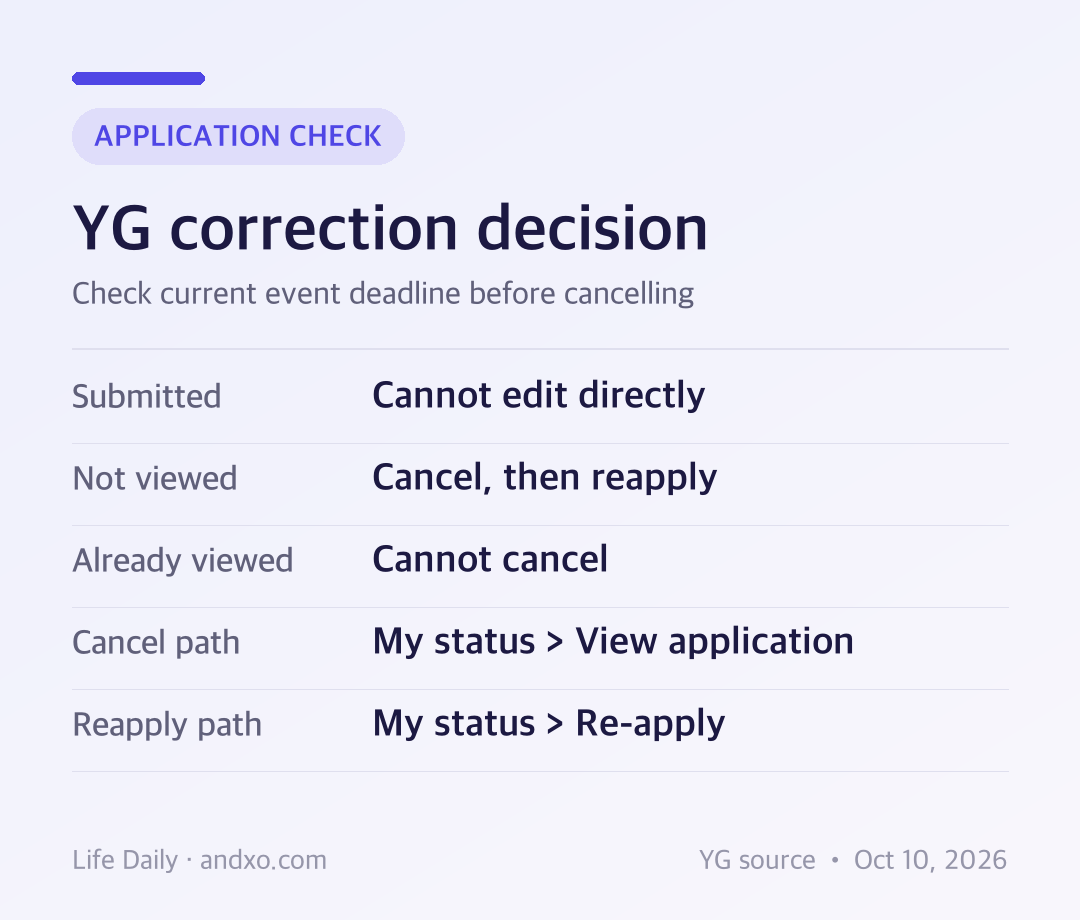
Original Andxo decision chart based on YG’s official application modification FAQ, checked October 10, 2026. This is explanatory guidance, not a view of any applicant’s private account.
The FAQ says you cannot cancel after manager review. It does not describe an alternative correction workflow for that condition. Do not assume another account, repeated submissions or an unrelated email will replace the existing application.
Use the official Q&A area if you need clarification about a material error. The checked FAQ does not promise that support will change a reviewed application or reopen a closed event. Explain the issue accurately and avoid sending unnecessary sensitive documents until an official channel asks for them.
Check the event notice and current application screen for its actual deadline before cancellation. The general FAQ does not guarantee that you can reapply after a particular campaign closes. Cancellation and eligibility are different questions, and this guide does not extend a deadline.
If the mistake involves the file, correct the export before starting a new submission. YG’s upload FAQ lists a 200 MB limit and MP4, MOV or HEVC formats. It tells applicants whose file is within the limit but still cannot upload to use the 1:1 question channel.
Those are the general English FAQ’s upload instructions, not proof that every event accepts the same materials or requires the same performance duration. Read the exact campaign’s category rules. In particular, do not apply a monthly on-site performance rule automatically to an online submission.
Can I edit one field without cancelling? The checked FAQ says submitted applications cannot be edited. It describes cancellation and reapplication instead, subject to the review limitation.
Can I cancel after the manager reads it? No. The FAQ explicitly says cancellation is unavailable once the manager has viewed the application.
Does a corrected application guarantee a new review or acceptance? The source does not promise either. It explains the correction procedure only.
Will a result arrive for every applicant? YG’s general result FAQ says results take approximately two to four weeks and successful applicants are contacted individually by email or phone. Do not treat that as a guaranteed message for every applicant or a campaign-specific deadline.
Do I need to travel to Korea to fix a form? No such procedure is stated. YG says first-round successful applicants receive further steps individually; do not book travel based on an application correction guide.
For broader program selection, use the audition hub, then return to the current YG official notice and FAQ for your chosen route.
YG official English FAQ, application modification, upload and result entries; YG official audition portal. Checked October 10, 2026 KST. No private application account was inspected, and no cancellation or submission was performed to produce this guide.
K-POPPrepare the name, age, gender and field in your SM email subject, then attach clear performance media and a face photograph using the official listed formats.
2026년 10월 10일
 K-POP
K-POPKOZ lists a self-made demo for producing and a portrait plus one unaccompanied verse for vocal. Match your materials to the category before applying.
2026년 10월 10일
 K-POP
K-POPSubmitted WAKEONE files cannot be edited. Its FAQ allows resending updated materials in the same month, while ordinary reapplications are limited to once per month from the next month.
2026년 10월 9일
 K-POP
K-POPBELIFT LAB excludes submissions with an obscured face. Prepare front-facing and full-body photos for every category, then match your performance framing to vocal, rap, dance or creative work.
2026년 10월 9일